- 您现在的位置:买卖IC网 > Sheet目录1063 > 10136-6000EC (3M)CONN MDR PLUG 36POS IDC GOLD
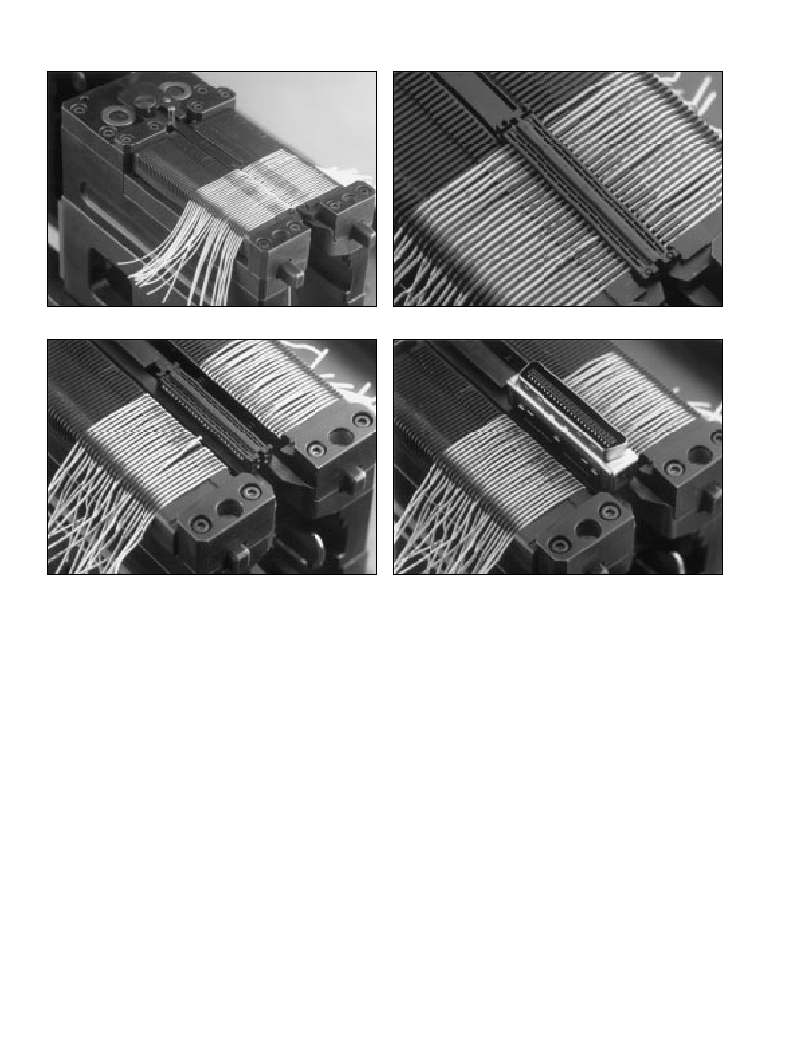
Figure 8. Wires in “U” slot cover
Figure 10. Cut wires
8
10
Figure 9. 2nd cover on top of wires
Figure 11. Connector body
9
11
E. Repeat for the next conductor, except position it to
the rear and right. Place the next wire in the left slot
(adjacent to the first one), followed by another wire
in the right slot, etc., until all conductors are
in position. Proceed to Step 5.
0.025” Flat Ribbon Cable
A. To use the fixture unit, first remove the cable clamp
stop (B of Fig. 6) from the fixture unit. This is done
so that the flat cable may be inserted into the
fixture unit without obstruction.
B. Slide the prepared cable end into the fixture slot so
the first conductor is towards the back, facing
the left side.
C. Lay the conductors into the grooved wire holding slot
accordingly until all conductors are positioned.
Proceed to Step 5.
7.
8.
9.
10.
11.
12.
Push shuttle block with fixture unit and cable
subassembly away from the operator, back under
the cutting unit, until it contacts the shuttle stop.
Pull the press handle down and release, cutting
the wires (Fig. 10).
Push platen back into place using the side bar.
Pull the shuttle out. Placing one finger near the center
of the covers to prevent movement or wire dislocation,
remove the cut wires from the fixture unit.
Push the release buttons on the front of the fixture unit to
allow placement of the connector body over the covers
(Fig. 11). Make sure the alignment tab on the inside end
of the connector body is aligned with the notch on the
second cover, nearest the operator. Push the connector
body down over the covers until a slight “click” is heard.
Push shuttle block, with fixture unit and cable
5.
Pick up second cover and rub the paper liner to ensure
subassembly, away from the operator until it stops.
6.
transfer of adhesive to the cover. Remove the paper liner
from the back of the second cover and place the cover
(adhesive side down) over the wires and first cover,
aligning it with the first cover’s guide pins. Keep the
notched end toward the operator. Press it down on
the first cover’s guide posts (Fig. 9).
Slide the platen assembly forward using the side bar
13.
14.
15.
Pull press handle completely down, pressing connector
body onto the covers and subassembly.
Lift handle and pull shuttle block and assembly
toward the operator.
Completed assembly may now be removed
from the fixture unit.
on the operator’s left side to reveal the cutting unit.
4
发布紧急采购,3分钟左右您将得到回复。
相关PDF资料
10150-4CZ3PL
CONN MDR PLUG 50POS VERT T/H
10150-72E2PC
CONN MINI-D 50POS R/A PLUG
10150-8000EE
CONN PLUG 50 POS MINI-D
10168-6010EC
CONN MDR PLUG 68POS IDC 26AWG
101A0-4CZ3JL
CONN MINI-D 100POS VERT PLUG
101A0-900APL
CONN MDR PLUG 100POS VERT SLD
101A0-900AVC
CONN MINI-D 100POS EDGE PLUG
102-799-16
CONN PLUG 1.0/2.3 PUSH PULL
相关代理商/技术参数
10136-6000EL
功能描述:D-Sub微型D连接器 36P METAL FACE PLUG 28 AWG RoHS:否 制造商:3M Electronic Solutions Division 位置/触点数量:26 排数:2 安装风格:SMD/SMT 安装角:Right 端接类型:Solder 型式:Female
10136600-101LF
功能描述:VS2 5X6 RH SM 1S/G 制造商:amphenol fci 系列:* 零件状态:在售 标准包装:1,500
10136600-102LF
功能描述:VS2 5X6 RH SM 2S/G 制造商:amphenol fci 系列:* 零件状态:在售 标准包装:336
10136644-0311LF
功能描述:MINITEK PWR 4.2 REC HSG 制造商:amphenol fci 系列:* 零件状态:在售 标准包装:1,000
10136644-0321LF
功能描述:MINITEK PWR 4.2 REC HSG 制造商:amphenol fci 系列:* 零件状态:在售 标准包装:1,000
10136644-0322LF
功能描述:MINITEK PWR 4.2 REC HSG 制造商:amphenol fci 系列:* 零件状态:在售 标准包装:1,000
10136644-0411LF
功能描述:MINITEK PWR 4.2 REC HSG 制造商:amphenol fci 系列:* 零件状态:在售 标准包装:1,000
10136644-0421LF
功能描述:MINITEK PWR 4.2 REC HSG 制造商:amphenol fci 系列:* 零件状态:在售 标准包装:1,000